Deputy: Employee Scheduling
- 4.7
- Rating
- 1.00M
- Installs
- Free
- Price

 Analysis by App-foxy
When a team still manages shifts through scattered messages, handwritten notes, or a shared spreadsheet, even a small change can create a surprising amount of confusion. Deputy: Employee Scheduling is built for that everyday problem: bringing work schedules and shift planning into one place so managers and employees can follow the same plan. I found it most useful as a practical business app rather than a broad all-purpose office tool. Its value appears when several people need to know who is working, when they are expected, and what has changed.
The app is developed by Deputy.com and is available as a free download for everyone. It includes in-app purchases ranging from $0.99 to $99.99 per item, so I would treat the free installation as a way to explore the experience rather than assuming every business workflow will remain free. Its average rating is 4.7 from around 19 thousand ratings, and it has passed one million installs. Those figures suggest that it has found a substantial audience, but they do not remove the need to check whether its scheduling approach suits the way your workplace actually operates.
What to expect before you build a schedule
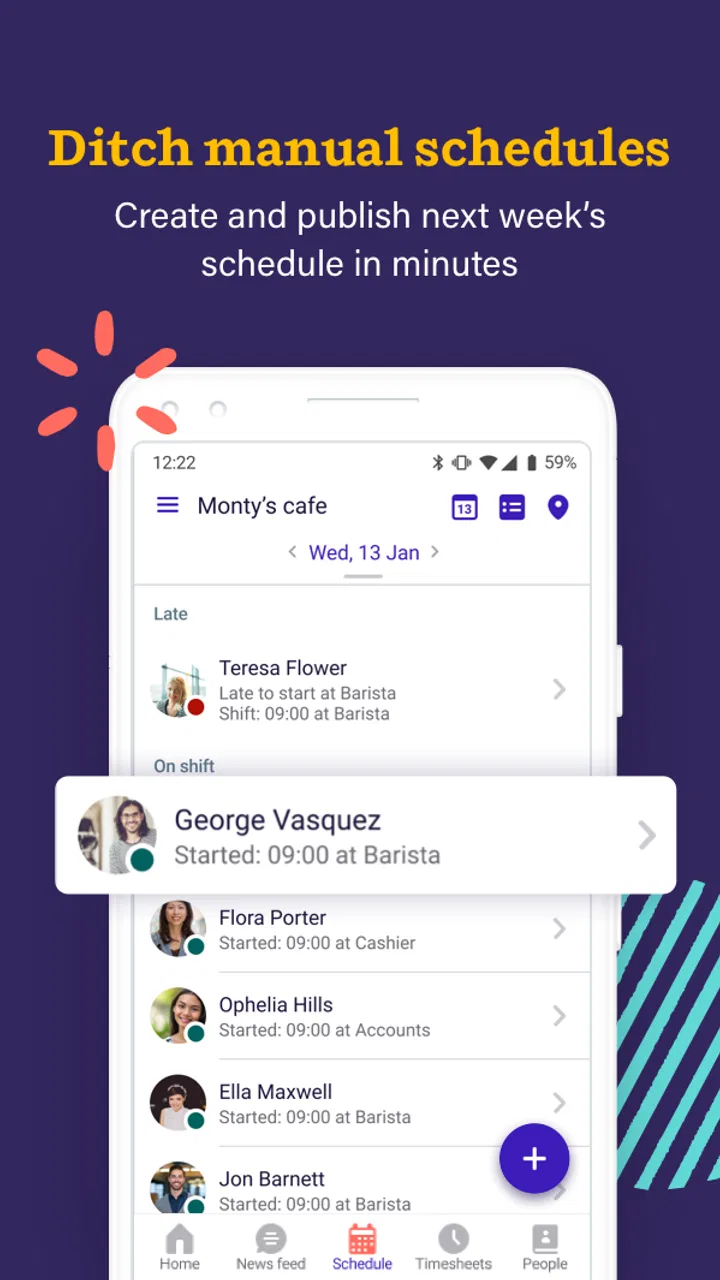
The central idea is straightforward: a manager creates or organizes shifts, while employees use the schedule as their reference point. That sounds simple, but the real benefit is reducing the number of places where information can go wrong. Instead of asking a colleague whether a shift was moved or searching through an old message, a worker can return to the scheduling app and check the current arrangement.
You May Also Like

 Blood Strike: 2.5 Anniversary
Blood Strike’s Loadouts Turn Every Drop Into a Tactical Gamble
A close look at Blood Strike’s custom loadouts: how fast access to signature weapons reshapes its battle royale rhythm, rewards preparation, and narrows the gap between fights.

 Pandora - Music & Podcasts
Pandora’s Music Is Easy to Start, but Harder to Recover
Pandora’s strength is its low-effort path from a seed to a station. Its weak spot is how much confidence it asks you to place in connection, setup, and quiet recovery.

 8 Ball Pool
 Is Built on Rivalries, Rematches, and Routine
A close look at the rivalries, rematches, shared routines, and unanswered safety questions that turn a quick pool match into a persistent mobile community.

 Samsung Music
’s Quiet Strength Is Playing What You Already Own
Its reach comes less from spectacle than from dependable access to a personal library. That simplicity is both the app’s strongest retention engine and its ceiling.

 AccuWeather: Weather Radar
AccuWeather Review: A Quick, Clear Forecast for Everyday Decisions
For everyday plans, the best forecast is the one you can understand quickly. AccuWeather makes rain timing, radar, and local conditions easy to act on, with a few trade-offs.

 Hill Climb Racing
Why Hill Climb Racing Still Turns Crashes Into One More Run
A tiny car, a bumpy hill and one more upgrade: Hill Climb Racing keeps resurfacing because its simple chaos makes every near-miss feel personal.
More From Our News Desk



I would especially consider it for cafés, shops, salons, small service businesses, and other teams where working hours change from week to week. It can also make sense for a department with part-time staff, rotating availability, or frequent cover requests. In those settings, a schedule is not just a calendar entry. It is a shared operational document that affects opening, closing, handovers, and customer coverage.
That focus also explains where the app may not be the best fit. If you only need a private calendar for yourself, Deputy is likely more structure than necessary. A standard calendar can be quicker for personal appointments, while a spreadsheet may be enough for a very small team that rarely changes its timetable. The advantage here begins when multiple people need a common schedule and one person needs to keep it organized.
On my first pass, I would not expect the app to solve staffing decisions automatically. A scheduling tool can show the plan clearly, but it cannot know whether a particular employee is suitable for a task unless the workplace has already established that information. The manager still has to make sensible decisions about coverage and communicate any unusual arrangement. Deputy is best understood as a coordination layer, not a replacement for judgment.
The business category is important because the app is designed around workplace routines rather than casual planning. That affects the way I would evaluate it. The key question is not whether it has the prettiest calendar, but whether a team can move from uncertainty to a dependable published schedule without creating extra administration.
How I would prepare for the first use
Before opening the app, I would gather the details that usually slow down setup: the names of the people who need access, the days and times the business operates, and the basic shift patterns that repeat. This small preparation matters. If you begin by entering isolated shifts without deciding how your week is organized, the schedule can become difficult to read even when every individual entry is correct.
I would also decide who owns the schedule. In a small workplace, that may be the owner or one supervisor. In a larger team, more than one person may need to make changes. Establishing that responsibility early prevents the common problem of several people editing the same plan informally and then disagreeing about which version is current.
The app is free to install and carries an Everyone content rating, which makes it approachable for a mixed-age workforce. It supports Android devices running version 7.0 or later, so anyone using an older phone should check compatibility before relying on it for work. The current version is 26.33.0, giving the app a modern release baseline, although the day-to-day experience can still depend on the phone and the workplace setup.
I would begin with one representative week rather than trying to reproduce an entire season. Choose a normal week containing the most common shift types. This gives you a useful test of the workflow without burying the first attempt under exceptions. If the team cannot understand that sample schedule, adding more weeks will only make the underlying issue harder to see.
A helpful preparation trick is to write down the schedule in plain language first. For example, note who opens, who covers the busiest period, and who closes. Then translate that into the app. This prevents the interface from becoming the place where you make basic staffing decisions for the first time. You arrive with a plan and use Deputy to organize and share it.
The first meaningful success
For a first-time user, I would define success very simply: create a realistic shift plan for one working day, make sure the right people can recognize their assignments, and confirm that the team knows where to look for the current version. That is more valuable than filling the app with a large amount of imperfect information.
Start with a day that represents normal operations. Add the people needed for that day, place the shifts in their actual time blocks, and read the result as if you were an employee arriving for work. Can you tell immediately when you are expected to start? Can you distinguish an opening shift from a closing shift? Can a supervisor see whether the important coverage periods are filled? If the answer is yes, you have reached the first useful milestone.
I recommend checking the schedule from the employee’s point of view before expanding it. Managers often understand the logic behind a plan because they created it, while employees see only the final arrangement. A schedule that makes sense to its author can still be unclear to the person using it on a busy morning.
Once the first day looks right, repeat the same pattern for the rest of the sample week. Notice where the process becomes repetitive. Repetition is not automatically a weakness; consistent entry can be safer than improvisation. But if every small change requires several manual corrections, that is a sign to simplify your shift patterns or reconsider whether the app is saving enough time for your operation.
A realistic example would be a small café whose manager normally sends next week’s shifts in a group chat. One employee swaps a Saturday afternoon shift, another asks about Sunday opening, and the manager has to answer the same questions repeatedly. With Deputy, the manager’s first success would be a single shared schedule that reflects the planned coverage and gives the team one place to check. The important improvement is not merely digital presentation. It is that a later conversation can refer back to a common schedule instead of competing messages.
My practical advice is to make one controlled change after the initial schedule is ready. Move one shift, update the plan, and ask an employee to check the revised version. This tests the part of scheduling that matters most in real life: not creating a perfect plan once, but keeping everyone aligned when the plan changes.
Where new users can get confused
The first common confusion is treating the schedule as a personal calendar. A personal calendar is usually private and centered on one person’s appointments. A work schedule is shared, and its meaning depends on the wider team. If you enter information without considering how another employee will interpret it, the result may be technically complete but operationally weak.
The second is assuming that a published-looking plan is automatically understood. Employees may still need a clear workplace habit: check the app at a particular point before the workweek, and check again when a change is announced. The app can centralize the schedule, but the manager has to establish that it is the authoritative place to look.
Another source of friction is handling exceptions. A normal recurring shift is easy to understand; a one-off change, partial cover, or unusual opening arrangement requires more attention. I would avoid hiding exceptions in informal notes or messages. If a change matters to attendance or coverage, it should be reflected in the schedule workflow your team has agreed to use. Otherwise, the app and the conversation can drift apart.
There is also a human issue behind scheduling accuracy. If employees have different availability or responsibilities, a manager should not rely on memory while entering shifts. Keep a simple internal reference for constraints and review the completed week before treating it as final. Deputy can organize the schedule, but careful review remains essential, particularly for teams with many part-time workers.
Some users may also wonder whether the free label means the whole business can operate without cost. I would read the purchase information carefully before moving a full team onto it. The app itself is free to download, but in-app purchases are present, with individual items priced from $0.99 to $99.99. That does not make the app unsuitable, but it does make a small trial sensible. Test the exact workflow your workplace needs and understand what becomes available before making it the foundation of staff planning.
Privacy and workplace expectations deserve attention as well. Employees should know how the schedule will be used and who is responsible for corrections. Even a well-designed scheduling tool can create frustration if people discover changes indirectly or feel that the digital schedule is being used without a clear process. A short explanation from the manager can prevent more confusion than another round of interface exploration.
Useful habits beyond the basic schedule
One non-obvious strength of a dedicated scheduling app is that it can encourage a single source of truth. The benefit is strongest when the team stops maintaining parallel versions in a spreadsheet, a chat thread, and a printed sheet. I would choose one backup method only for unusual circumstances, not as a second schedule that competes with the app.
A second useful insight is to build the week around coverage points rather than individual preferences. First identify when the business must have enough people present, then assign the available team around those periods. This makes the schedule easier to audit and helps reveal gaps before they become someone’s problem during a shift. Deputy gives the plan a shared home, but this coverage-first method improves the quality of what you put into it.
A third is to use the first week as a process test, not just an entry exercise. Watch where employees ask questions. If several people ask when a shift starts, the schedule may need a clearer convention. If they ask whether a change is final, the workplace needs a stronger update habit. These observations are valuable because they show whether the team understands the schedule, not merely whether the manager can create one.
For managers, I would review the completed schedule in three passes. First, check that every required period has coverage. Second, check for obvious clashes or implausible transitions. Third, read it as an employee who has not been involved in building it. This takes less time than correcting a misunderstanding after the workday begins and is more reliable than trusting the schedule because it looks tidy.
For employees, the most useful habit is to check the current schedule before making personal commitments around work. If a change is discussed verbally, confirm that it has been reflected in the shared plan or clarify which instruction is final. This is not about blaming the app; it is about recognizing that a scheduling system only works when the team uses it consistently.
How it compares with familiar alternatives
Compared with a group chat, Deputy offers a more stable reference point. Chat is excellent for quick questions, but important schedule details can disappear beneath newer messages. A dedicated schedule is easier to revisit and less dependent on remembering who said what. I would still keep chat for urgent communication, but I would not want it to be the only record of weekly shifts.
Compared with a spreadsheet, the app is more natural for employees who mainly need to check their own working time rather than edit rows and columns. A spreadsheet can be highly flexible and cheap, especially for a technically confident manager. Its weakness is that formatting, permissions, duplicate copies, and accidental edits can become part of the job. Deputy is more purpose-built for the employee-scheduling problem, though that specialization may feel restrictive to someone who wants complete spreadsheet control.
Compared with a paper rota, the app is easier to update when plans change and more practical for teams that are rarely in the same place. Paper still has one advantage: it is immediately visible in a workplace without requiring anyone to open a device. A business with a stable, co-located team and almost no changes may not gain enough from switching. A team spread across locations or changing shifts frequently is more likely to appreciate the digital approach.
Compared with a general calendar, Deputy is better aligned with staff scheduling rather than personal appointments. A calendar can show time blocks beautifully, but it may not match the way a manager thinks about employee coverage. I would choose the general calendar for individual planning and Deputy when the schedule belongs to a team and needs a workplace routine around it.
Who should use it and who should skip it
I would recommend trying Deputy if you manage a small or medium-sized team with changing shifts and you are tired of repeating schedule information. It is also worth considering if employees work different days, if coverage changes regularly, or if a manager needs a clearer alternative to a long message thread. The app’s strong user rating and broad install base make it a reasonable candidate for a trial, but the fit should be judged by the team’s actual workflow.
I would be more cautious if your operation has only one or two people and a fixed timetable. In that situation, the setup and shared-schedule habits may take more effort than they save. I would also hesitate if your business needs a highly customized planning system that goes well beyond employee shifts. A spreadsheet or a specialized workforce platform may be a better match when unusual rules and complex reporting dominate the work.
Employees who simply want to see when they work may find the app useful, but their experience depends heavily on the manager maintaining it. If the schedule is not kept current, no scheduling app can compensate. Before asking a team to rely on it, I would make sure the person responsible for updates is willing to treat that responsibility as part of the job.
My next-step recommendation
After the first successful day and sample week, I would run a short team trial using a normal operating period. Ask employees to use the app as their main schedule reference and note the questions that still arise. Do not measure success only by whether the schedule exists. Look at whether fewer people need to ask for basic shift details, whether changes are understood, and whether the manager spends less time reconciling different versions.
Before expanding the rollout, review the purchase structure and decide whether the available plan matches your team. The free download lowers the barrier to testing, while the in-app purchase range means the financial decision should come after you understand the workflow you actually need. This is a better approach than committing based only on the attractive entry price.
Deputy has been available since August 21, 2013, and its current version is 26.33.0. I see that long availability as a reason to take it seriously, not as proof that it will suit every workplace. My own recommendation is to begin narrowly: one responsible manager, one representative week, one clear rule about where the current schedule lives, and one deliberate test of a schedule change.
Overall, I like Deputy as a focused answer to a familiar business problem. It is not magic, and it does not remove the need for thoughtful staffing decisions or clear communication. What it can do is make the schedule easier to share, revisit, and update than the usual mixture of chat messages, spreadsheets, and paper. If your team’s main pain is uncertainty about who works when, this is a sensible app to trial before choosing a more complicated system.
FAQs for Deputy: Employee Scheduling
01What is Deputy: Employee Scheduling used for?
Deputy: Employee Scheduling is designed to help businesses organize employee shifts, manage availability, track attendance, and communicate schedule changes. After exploring the app, its main strength is bringing scheduling and workforce coordination into one place. Managers can create rosters, review timesheets, and share updates, while employees can check upcoming shifts, request changes, and stay informed from an Android or iOS device.
02Is Deputy suitable for small businesses or only large companies?
Deputy can be useful for both small businesses and larger organizations, particularly those working with hourly employees or rotating shifts. It is commonly suited to industries such as retail, hospitality, healthcare, and services. Smaller teams may appreciate the simpler scheduling workflow, while larger companies can benefit from staff management and reporting tools. However, the available features and pricing may vary by plan and region.
03Can employees request time off and swap shifts in Deputy?
Yes, Deputy generally allows employees to view their schedules, submit leave or time-off requests, and communicate availability through the app. Depending on the settings chosen by the employer, workers may also be able to offer or swap shifts with colleagues, usually subject to manager approval. This makes the app practical for flexible workplaces, although employees should remember that permissions are controlled by their organization.
04Does Deputy track employee hours and attendance?
Deputy includes tools for recording working hours and monitoring attendance, which can be helpful for comparing scheduled shifts with actual time worked. Employees may clock in and out using supported devices or workplace settings, while managers can review timesheets and identify missed punches or discrepancies. The exact tracking options depend on the employer’s configuration, subscription plan, and any connected payroll or workplace systems.
05Is Deputy: Employee Scheduling free to download and use?
The Deputy app may be available to download at no initial cost, but access to its full workforce-management features typically depends on an employer’s Deputy account, subscription, or trial arrangement. Individual employees usually cannot unlock the complete service independently if their workplace has not adopted it. Before downloading, check the current Google Play or App Store listing and confirm whether your organization supports Deputy.
Pros
- Quickly view shifts
- schedules
- and workplace updates in one app.
- Shift swapping and availability tools simplify schedule changes.
- Clock-in features can help employers track attendance accurately.
- Push notifications keep employees informed about schedule updates.
- Supports communication between managers and team members.
Cons
- Some features require an employer-managed Deputy account.
- Location permissions may be needed for certain time-tracking functions.
- App usefulness depends on how fully your workplace uses Deputy.
- Frequent notifications can feel excessive without careful settings.
- Timesheet and scheduling tools may be confusing for first-time users.

Deputy: Employee Scheduling
Gallery